Files in Google Drive

Advanced Drive Service in Apps Script 에 이어서  Files and folders overview 를 보면 파일 속성 중에 ID가 있습니다. File attributes File ID A unique opaque ID for each file. File IDs are stable throughout the life of the file, even if the file name changes. Files in Drive cannot be directly addressed by their path. Search expressions are used to locate files by name, type, content, parent container, owner, or other metadata. 제가 만든 복사 앱은 파일이나 폴더 URL을 입력 받아서 복사본을 만듭니다. 참고:  G 폴더 복사 앱 설명서 파일을 복사하기 위해서 drive.files.copy를 사용합니다. 이때 Parameter에 file Id를 넣어줘야 합니다. Files: copy 를 참고하세요. 따라서 파일이나 폴더 URL에서 파일 ID를 추출해야합니다. 예전에 stackoverflow에서 검색해서 코드에 적용했는데 조금 바뀌었네요. Easiest way to get file ID from URL on Google Apps Script https://stackoverflow.com/questions/16840038/easiest-way-to-get-file-id-from-url-on-google-apps-script/16840612 function getIdFromUrl(url) {   return url.match(/[-\w]{25,}/); } 마지막에 있는 ID를 구하기 위해서 $를 추가했네요. /[-\w]{25,}$/ $를 추가하면 파일 ID...

Advanced Drive Service in Apps Script.

Writes Apps Script errors in this spreadsheet 에 이어서 Google Apps Script로 Web App을 만들면서 try ... catch를 사용했습니다. 오류가 나면 Error 객체를 반환하는데 이때까지 name과 message만 사용해서 오류를 처리했습니다. message에 있는 문자열이 뭔가에 따라서 처리했는데 하면서도 이건 아니다 생각했었죠. Google Apps Script에서  Google Drive API 를 사용할 수 있도록  Advanced Drive Service 를 제공합니다. 다음은 Google Drive API에서 제공하는 오류입니다. Resolve errors https://developers.google.com/drive/api/v2/handle-errors {   "error": {     "errors": [       {         "domain": "global",         "reason": "badRequest",         "message": "Bad Request"       }     ],     " code ": 400,     "message": "Bad Request"   } } {   "error" : {     "errors" : [       {         "domain" : "global" ,         "reason" : "badRequest" , ...

Writes Apps Script errors in this spreadsheet.

이미지
저는 Apps Script로 앱을 만듭니다. https://www.eojji.com/app Google Drive REST API를 사용하는데 다양한 오류가 발생합니다. 다른 분들과 공유하기 위해서 스프레드시트에 기록 중입니다. https://docs.google.com/spreadsheets/d/1p-saNPVWm1ZTBtryYkxY8rL0wk_pQClM5xThogaHtBs/edit?usp=sharing Writes Apps Script errors in spreadsheet.png 이 시트에 기록할 내용이 있으면 보내 주세요. 개발에 반영하겠습니다. https://hi.eojji.com/ 만약 파일 복사 API 호출에서 발생한 오류가 일시적이면 지수적 감속으로 다시 시도합니다.   if (resp.name == 'HttpResponseException' ||       resp.message.indexOf('Internal Error') >= 0 ||       resp.message.indexOf('Backend Error') >= 0 ||       resp.message.indexOf('Transient failure') >= 0 ) {           copiedState.check = '-2'; // 지수적 감속 참고: Deduper Resolve Errors, Exponential backoff https://eojji.blogspot.com/2019/06/deduper-resolve-errors-exponential.html Resolve errors - Google Drive API https://developers.google.com/drive/api/v2/handle-errors Troubleshoo...

Copy to shared drives app

이미지
Copy to shared drives app manual Google 드라이브 Folder 복사 앱 설명서를 수정했습니다. https://docs.google.com/document/d/1rM01Sp_X6oCfTyTDyR8drUkucErI7iVezIM2FiR-B6U/edit?usp=sharing Web page https://copy.gfolder.net/ 앱 실행 URL bit.ly/GFolder 팀 드라이브와 공유 드라이브가 공존하고 있습니다. Team Drives is being renamed to shared drives https://gsuiteupdates.googleblog.com/2019/04/shared-drives.html Copy to shared drives app, 2019-06-21.png 앱에 추가된 기능이 있습니다. 모든 폴더에서 분리된 파일을 찾을 수 있습니다. https://cafe.naver.com/eojji/547 https://cafe.naver.com/eojji/548 파일 업로드 https://blog.naver.com/gsuite-reseller/221554030898

Deduper Resolve Errors, Exponential backoff

Remove Duplicate files in Google Drive 에 이어서 Apps script로 구글 드라이브 API를 호출하는데 구글 서버 오류가 발생하면 그냥 종료합니다. 앱 사용자가 로그 스프레드시트를 보고 중단된 이유에 따라 Find 버튼을 클릭할 수 있습니다. 서버 오류를 처리하기 위해서 ... Error GoogleJsonResponseException 다음 오류로 인해 drive.files.list API를 호출하지 못했습니다. Internal Error GoogleJsonResponseException 다음 오류로 인해 drive.parents.insert API를 호출하지 못했습니다. Backend Error 오류를 해결하기 위해서 찾아보니 Exponential backoff를 권장합니다. Resolve errors https://developers.google.com/drive/api/v2/handle-errors 500: Backend error An unexpected error occurred while processing the request. Retry failed requests to resolve errors https://developers.google.com/drive/api/v3/handle-errors#exponential-backoff You can periodically retry a failed request over an increasing amount of time to handle errors related to rate limits, network volume, or response time. For example, you might retry a failed request after one second, then after two seconds, and then after four seconds. This method, cal...

Remove Duplicate files in Google Drive

이미지
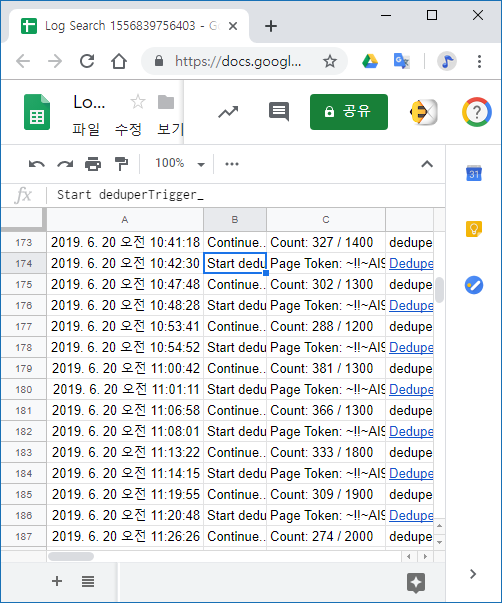
Google 드라이브에서 중복 파일 제거하기 구글 드라이브에서 파일 크기가 큰 거부터 읽어서 같은 파일이 있는지 검사합니다. 같은 파일이면 파일을 만든 순서대로 스프레드시트에 기록합니다. 같은 파일 중에서 최초로 만든 파일을 제외한 나머지 파일들을 특정 폴더에 추가합니다. 모든 파일의 중복 검사가 끝나면 이 폴더를 삭제하고 휴지통까지 비우면 중복 파일 제거가 끝납니다. DeduperTrigger_sheet.png 작업은 6분 주기로 실행됩니다. 한번 실행한 결과를 로그 스프레드시트에 기록합니다. Count: 274 / 2000 이것은 한번 실행할 때 2,000개 파일을 읽었고 그 중에서 중복 파일 274개를 찾아서 폴더에 추가했음을 뜻합니다. Drive Sheet App 실행 URL https://script.google.com/macros/s/AKfycbzJcy6zIAdI46QNFrY8JzhqpT2ZeJ2x9d2mxlzX2yDnlVSR8hw/exec 앱 개발 과정은 다음을 참고하세요. Duplicate files, Deduper in Google Drive Find the same file with md5 in Drive.Files.list Move duplicate files to the trash. Deduper in Drive Sheet app

Deduper in Drive Sheet app

이미지
Move duplicate files to the trash 에 이어서 중복된 파일을 휴지통 대신 특정 폴더에 넣기 위해서 Drive.Parents.insert를 사용했습니다. Parents: insert Adds a parent folder for a file https://developers.google.com/drive/api/v2/reference/parents/insert 내 드라이브에서 중복된 파일을 찾아서 원본만 남기고 나머지 파일을 '_ Deduper eojji' 폴더에 추가합니다. var folderName = '_ Deduper eojji'; 중복 파일 찾기가 완료되면 Deduper Spreadsheet의 B1 셀이 Completed로 변합니다. Deduper 폴더에서 필요없는 파일을 삭제합니다. Deduper 폴더를 삭제해도 됩니다. Deduper 폴더는 중복 파일 찾기를 위해서 Find 버튼을 클릭하면 만들어집니다. 저장 공간을 늘리기 위해서 휴지통을 비웁니다. Google 드라이브에 있는 파일 삭제 및 복원하기 https://support.google.com/drive/answer/2375102 Google 드라이브 공간 비우기 및 저장용량 늘리기 https://support.google.com/drive/answer/6374270 Drive Sheet App Drive Sheet App을 실행하기 위한 URL입니다. https://script.google.com/macros/s/AKfycbzJcy6zIAdI46QNFrY8JzhqpT2ZeJ2x9d2mxlzX2yDnlVSR8hw/exec Deduper in Drive Sheet app.png 중복 파일 찾기 작업을 시작하려면 앱 화면에서 Find 버튼을 클릭합니다. 작업을 삭제하려면 Delete 버튼을 클릭하세요. 주의: Search 작업도 같이 삭제됩니다. Lo...